For operations
Your weekly business review, without the copy-paste
Cue reads MRR and churn from Stripe, deals won from HubSpot, active users from Amplitude or PostHog and the rest from your Google Sheet. Next week's deck is one click: every number read again, a What changed slide, and a flag wherever the story no longer holds.
Free during early access.
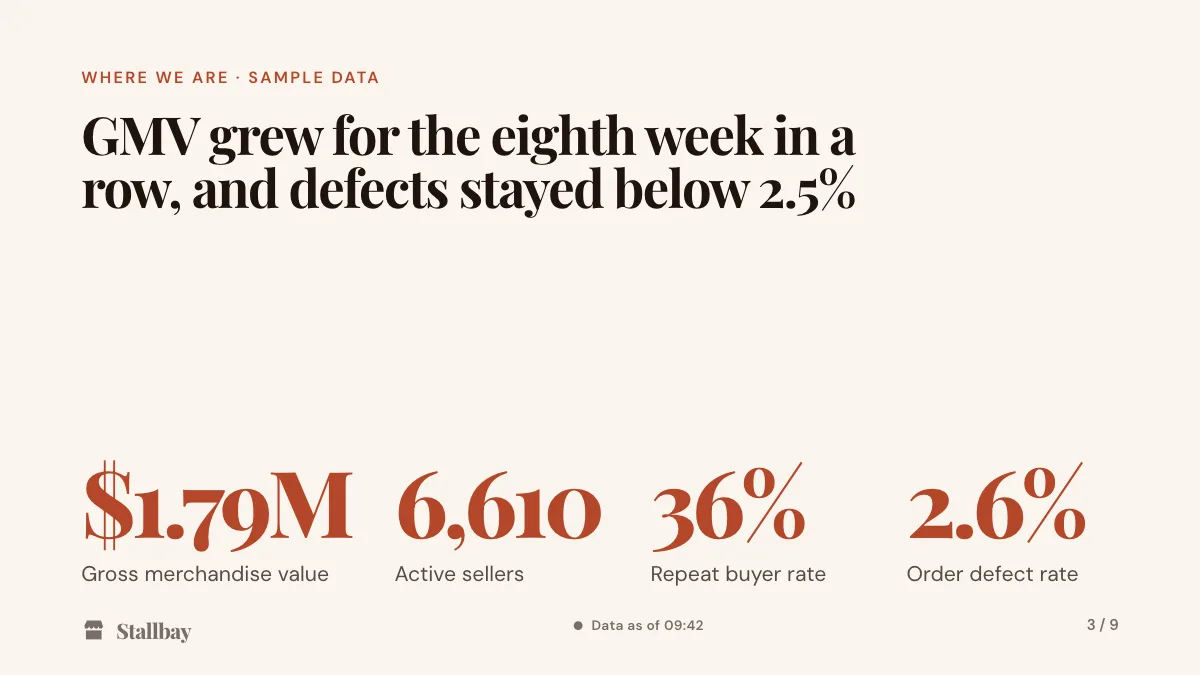
The problem
A morning of copy-paste, every Monday
The weekly business review is the same deck every week. Only the numbers and the story change. Still, Monday starts with the metrics sheet, the billing dashboard and the CRM open side by side, and every number copied onto its slide by hand. The monthly metrics review repeats it with more numbers.
Then comes working out what changed since last week, number by number, and hoping no headline still says churn is under 1.5%. The people in the review are remote, often in more than one country, and they watch a screen share in a language that isn't everyone's first.
Cue is built for the deck you present every cycle, not for one-off decks. Using Google Slides, PowerPoint, Pitch or Gamma today? See how Cue compares.
How Cue helps
Set it up once. Every Monday after is one click.
-
Bind the numbers once
Connect each number, chart or table to where it lives: MRR, churn and collected revenue from Stripe, pipeline and deals won from HubSpot, active users and retention from Amplitude or PostHog, or a Google Sheet, CSV or JSON URL.
-
Keep them fresh, and hear when they move
Sources refresh every hour or every day, and only changed numbers make a new version. Get an email when a number moves past the threshold you set, and see which decks use a source before you change it.
-
Next week, one click
Start next review copies the deck, reads every bound number again, writes a What changed slide from the difference and flags any slide whose story the new numbers no longer support.
-
Present to everyone, in their language
Run the meeting from your phone. People on the call open a follow link, with no account, and each picks one of 30 languages. Polls and Q&A run in the same link.
The same works for a monthly metrics review: bind it once, and every cycle after starts with one click.
Templates
Start from a template
Each template has the slides that review needs and a presenter note on every slide. Or import your current review from PowerPoint or Google Slides and keep running it in Cue.
-

Every week
Weekly business review template
8 slides: the headline, four key metrics, an 8-week trend, what changed, goals, risks and asks, the next two weeks and the decision you need. Reads MRR and churn from Stripe, active users from Amplitude or PostHog, or a Google Sheet, CSV or JSON URL.
See the weekly business review template -

Every quarter
Board update template
9 slides: the quarter in one sentence, key metrics against plan, ARR, highlights and lowlights, next quarter, asks and the decision you need. Reads from Stripe, HubSpot or your finance sheet in Google Sheets.
See the board update template
See all templates, including the sprint review.
Where your numbers come from
From the tools your business runs on
- Stripe
- HubSpot
- Amplitude
- PostHog
- Mixpanel
- ChartMogul
- Google Sheets
- CSV files
- JSON URLs
- Any MCP server
Each person connects their own account. Cue only ever calls tools that read.
Every week
Every review in one place, with its numbers over time
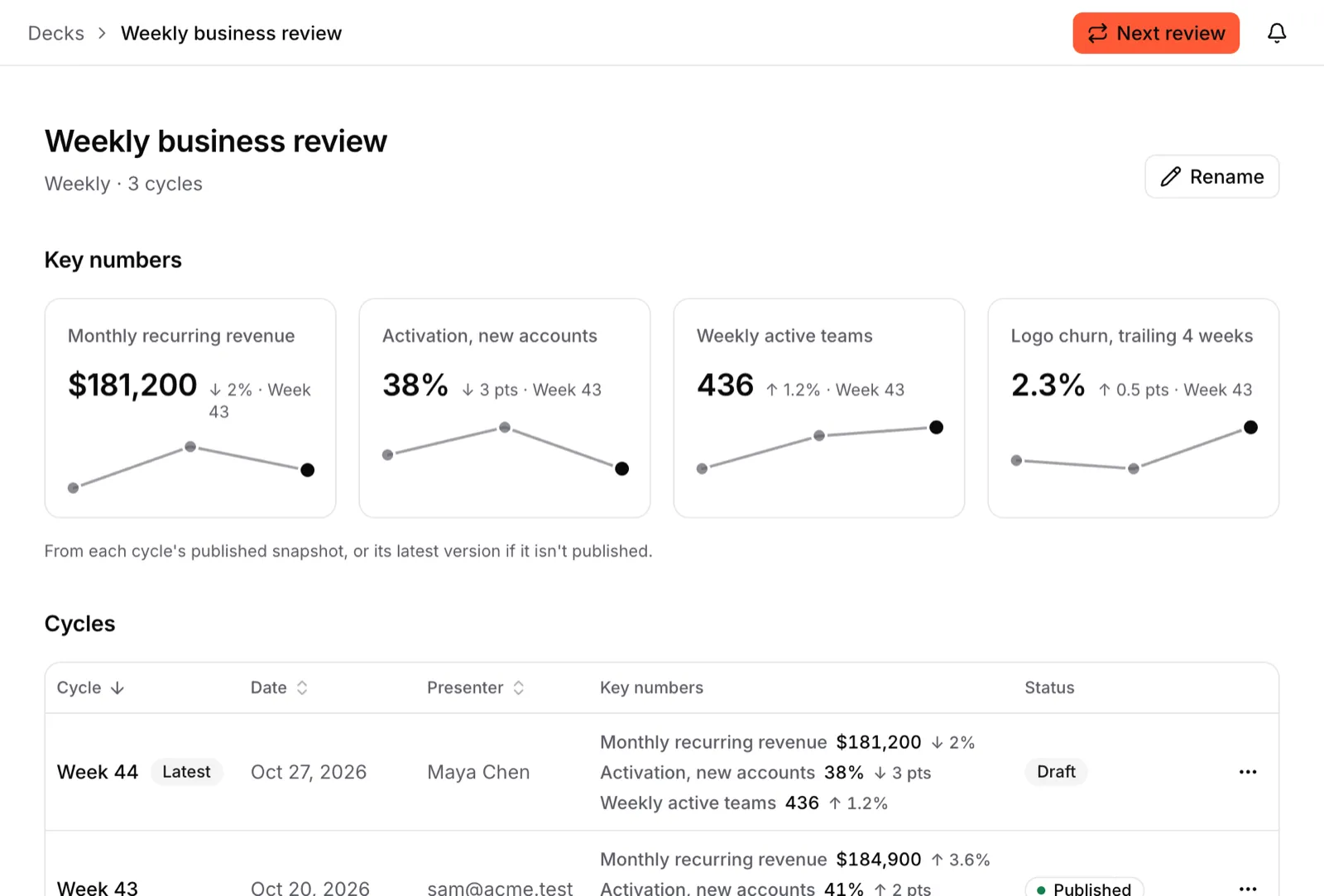
A series keeps each cycle with its date, presenter and key numbers, and charts the numbers across cycles. Earlier cycles keep the numbers they were presented with.
- Publish a snapshot, then share it as a link or a PDF.
- Mid-meeting, switch the room from the snapshot to live values.
- Every change is a version that records who made it, a person or an AI, and why.
Our numbers are in a spreadsheet. Does that work?
Yes. Bind slides to a Google Sheet (Cue sees only the files you pick), a CSV file or a JSON URL. Sources can refresh every hour or every day, and you can get an email when a number moves past a threshold you set.
Can people follow in their own language?
Yes. In the follow link each person picks one of 30 languages and reads the same slide, translated, in step with you, with numbers in their format and Arabic and Hebrew right to left. A new language for a deck is one AI action; Cue keeps the translation, so later edits only translate what's new.
Does everyone in the review need an account or a seat?
No. Anyone with a follow link or a share link can open it without an account. Every feature is free during early access; later, Team will be €15 per seat per month, and seats are only for people who edit: viewers and commenters are free. See pricing.
Run next Monday's review in Cue
Sign up with your email, import your brand and start from the weekly business review template. Free during early access.